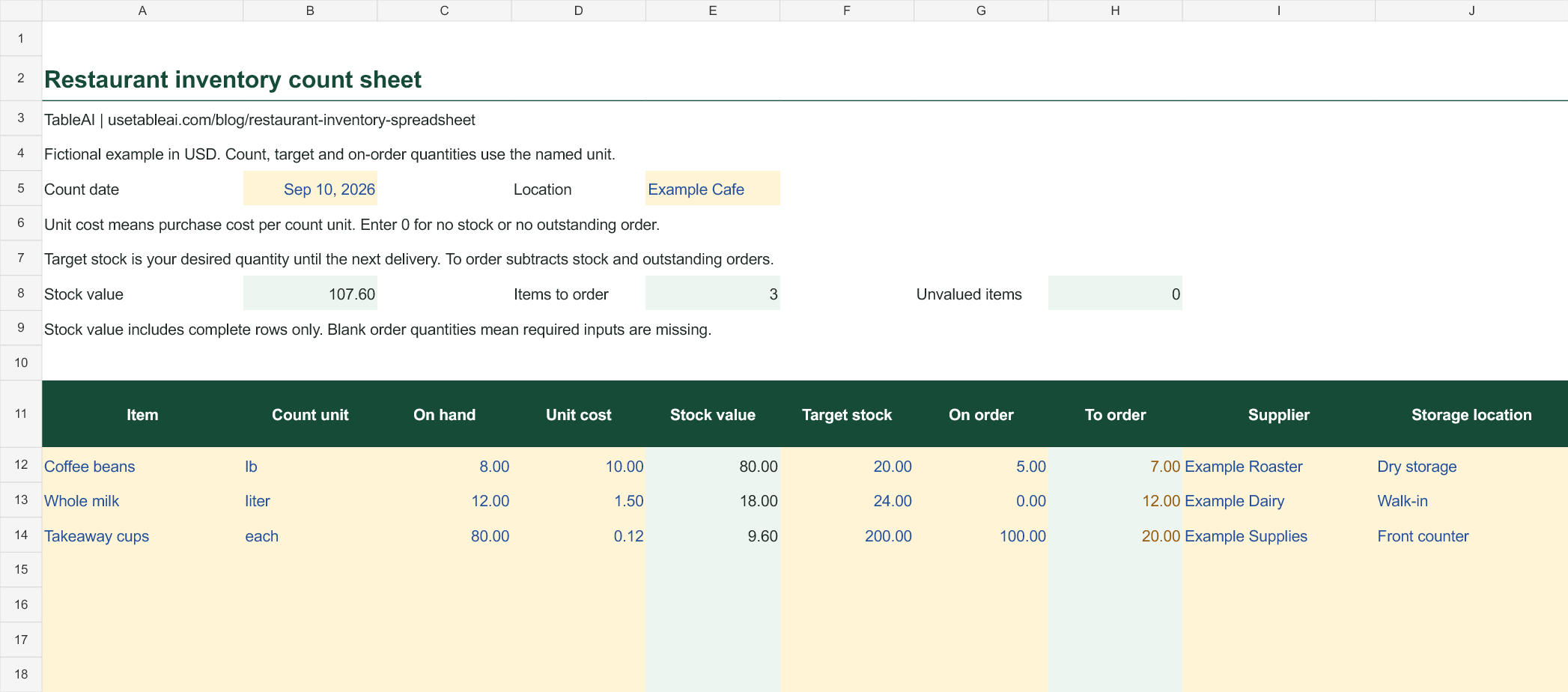
An inventory spreadsheet is useful when someone can walk through the kitchen, count what is there, and turn that count into a purchasing decision.
This free template has 50 item rows, automatic stock values and suggested order quantities based on the target levels you enter. It includes a blank Template tab and a fictional café Example tab. Download it for Excel or import the same file into Google Sheets.
What is in the count sheet?
| Column | How to use it |
|---|---|
| Item | A specific name, such as whole milk or house coffee beans |
| Count unit | The unit used for this row: lb, kg, liter, gallon, bottle or each |
| On hand | The physical quantity you counted |
| Unit cost | Purchase cost for one count unit |
| Stock value | On-hand quantity multiplied by unit cost |
| Target stock | The quantity you want available for the coverage period |
| On order | Outstanding quantity already ordered for that period |
| To order | Target minus on hand minus on order, with a minimum of zero |
| Supplier | Who supplies the item |
| Storage location | Where staff should count it |
Record the count date and restaurant location at the top. Yellow cells accept your inputs; green cells calculate. Use the same currency throughout the file. No currency conversion happens in the sheet.
A worked inventory example
These are fictional amounts in USD. Each row uses its own stated unit consistently.
| Item | Unit | On hand | Unit cost | Stock value | Target | On order | To order |
|---|---|---|---|---|---|---|---|
| Coffee beans | lb | 8 | $10.00 | $80.00 | 20 | 5 | 7 |
| Whole milk | liter | 12 | $1.50 | $18.00 | 24 | 0 | 12 |
| Takeaway cups | each | 80 | $0.12 | $9.60 | 200 | 100 | 20 |
The total counted stock value is $107.60. For coffee, the order calculation is 20 − 8 − 5 = 7 lb. Those five pounds already on order matter: ignoring them would buy more than the target requires.
The sheet does not round to your supplier's pack size. If beans arrive only in five-pound bags, review the seven-pound suggestion against the available packs, storage space and expected use before ordering.
Get the units right before counting
The count unit and cost unit must match. If a five-pound bag costs $50, the cost is $10 per pound. Eight pounds on hand are worth $80, not $400.
Likewise, if a case contains 100 cups and costs $12, enter 0.12 as the unit cost when the count unit is “each.” Count 80 cups as 80, not 0.8 cases, unless you change the entire row to cases.
Use either metric or imperial units for an item. The spreadsheet supports both as labels, but it does not convert between them. When a supplier changes pack sizes, update the cost per count unit before relying on the valuation.
Set up your first count
- List items in walking order. Start with one storage area and move through the kitchen. Include stock at the bar or service counter if it belongs in the count.
- Choose a repeatable time. Count at the same point in service and account for deliveries or stock movements during the count.
- Enter physical quantities. Use zero for an item that is actually out of stock. A blank count means it has not been recorded.
- Check costs against purchasing records. Use a consistent valuation method. For formal accounting, follow the method used in your books rather than switching methods between counts.
- Review orders separately. Enter target stock and outstanding orders in the same unit as the count. Verify expected delivery timing before submitting the purchase.
The small-restaurant inventory guide covers the counting routine in more detail. For beans, milk and short-life café products, see café inventory management.
Choosing a target stock level
Start with expected use until the next replenishment, then consider delivery uncertainty and shelf life. A target that fits a Monday-to-Wednesday delivery cycle may be wrong before a long weekend.
The template accepts the target you choose. It does not forecast demand, account for spoilage or decide how much safety stock is appropriate. An outstanding order arriving after you need the stock should not be treated as if it is already available.
If on-hand stock and outstanding orders exceed the target, To order displays zero. It never recommends a negative order. Review excess stock separately for expiry and possible purchasing changes.
Stock value is not food cost
This sheet values a count at one point in time. Food cost for a period also needs beginning inventory, purchases and ending inventory. Use the food cost calculator to bring those figures together.
Keep categories consistent. The example includes takeaway cups because they need ordering, but packaging should not be included in a food-only inventory figure. Separate food, beverages and supplies when transferring totals to your cost calculations.
Common questions
Can I use it in Google Sheets?
Yes. Download the Excel workbook, then open Google Sheets and choose File → Import → Upload. Import it into a new spreadsheet. Keep the blank Template tab for your own counts and the Example tab for reference.
Why is an order quantity blank?
The row needs an item, count unit, on-hand quantity, target and on-order amount. Enter zero for no stock or no outstanding orders. A blank result means information is missing, rather than that no order is needed.
Why does the sheet show unvalued items?
An item name has been entered but the count unit, quantity or unit cost is missing. The summary includes complete values only. Finish those rows before treating the stock-value total as complete.
Can I add more than 50 items?
Yes. Copy an existing row, including its formulas, and extend the summary ranges to include the added rows. Keep a dated copy of each completed count so you can compare periods.
Does this connect to TableAI?
No. The download is an independent spreadsheet. TableAI can help you record day-to-day inventory updates through WhatsApp, while physical counts remain part of a reliable stock routine. Explore TableAI if you want a simpler way to keep those daily updates moving.