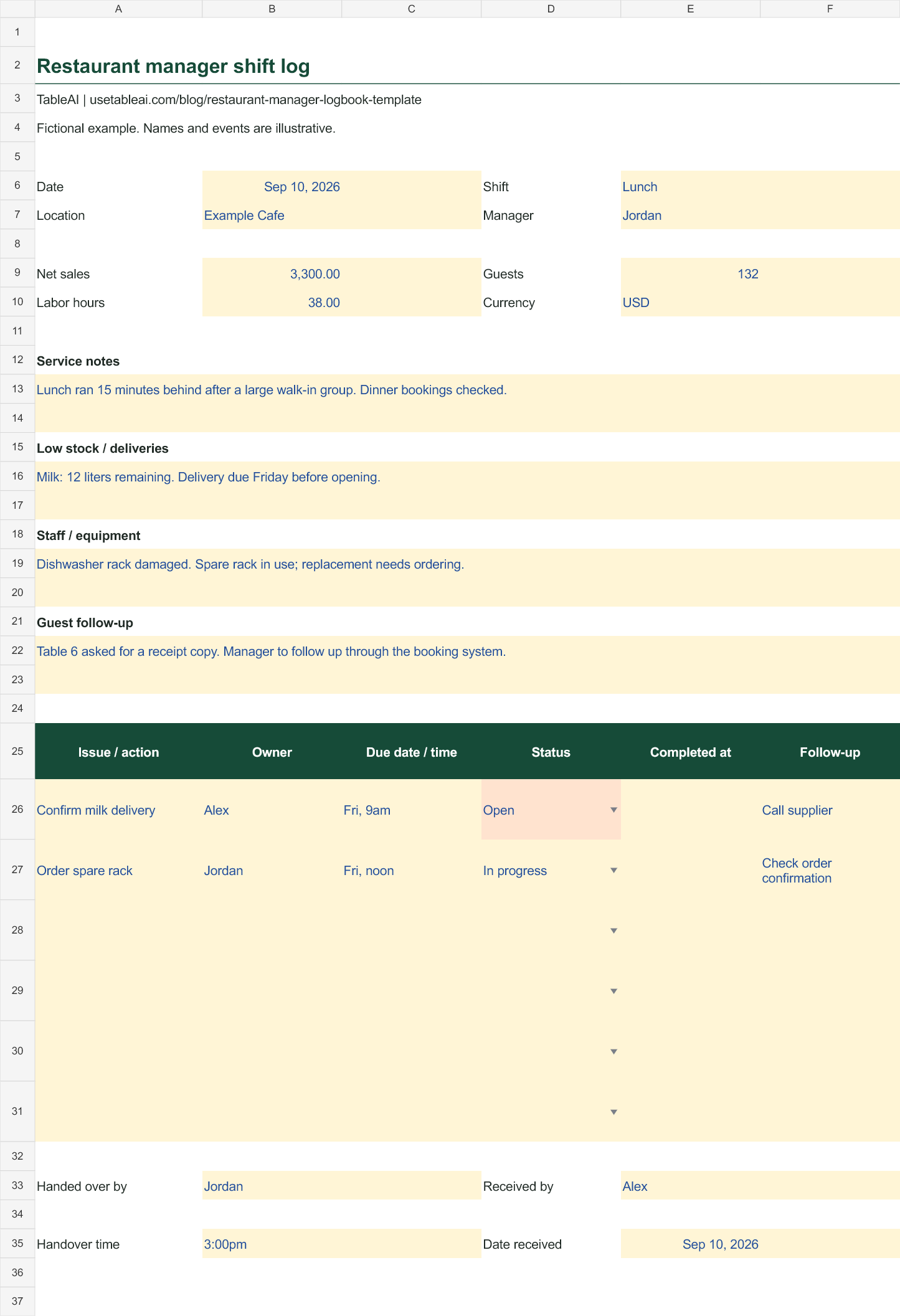
The lunch manager knows the milk delivery is late. The dinner manager starts service assuming it arrived. A useful shift handover closes that gap before it becomes a problem.
This free restaurant manager logbook gives each shift a place to record sales, service notes, stock problems and actions for the next manager. Download the editable Excel version or open the printable blank log above. The workbook includes a separate fictional example and can be imported into Google Sheets.
What belongs in a manager logbook?
Include information that changes what the next person needs to do. A long account of an ordinary shift makes the important details harder to find.
| Section | What to record |
|---|---|
| Shift details | Date, service period, location and responsible manager |
| Operating totals | Net sales, guests, labor hours and currency |
| Service notes | Delays, unusually busy periods and bookings that affect the next shift |
| Low stock and deliveries | Item, quantity remaining, expected delivery and next step |
| Staff and equipment | Coverage changes or equipment issues affecting service |
| Guest follow-up | Unresolved requests and who will respond |
| Action list | Specific task, owner, deadline, status and completion time |
| Handover | Who passed the shift over, who received it and when |
Keep sensitive staff or guest details in the appropriate restricted record. The shared shift log usually needs the operational action, not a person's private history.
A handover example
Here is a fictional lunch handover for an independent café. The amounts are in USD; the sheet has a currency field for your own records.
Shift totals: $3,300 net sales, 132 guests and 38 total staff hours.
Service note: A large walk-in group pushed lunch orders back by 15 minutes. Dinner bookings have been checked.
Stock note: Twelve liters of milk remain. The next delivery is due Friday before opening.
Equipment note: One dishwasher rack is damaged. The spare is in use.
Those notes need an action list:
| Action | Owner | Due | Status |
|---|---|---|---|
| Confirm the milk delivery | Alex | Friday, 9am | Open |
| Order a replacement rack | Jordan | Friday, noon | In progress |
“Milk low” leaves the next manager to investigate everything. “Twelve liters remaining; Alex to confirm Friday delivery by 9am” gives them a quantity, a next step and a responsible person.
How to run the handover
Before the outgoing manager leaves, fill in the shift totals and review unfinished actions from the previous entry. Use the daily sales report for supporting sales details instead of copying a full transaction list into the log.
Talk through urgent items together. Equipment failures, delivery changes and unexpected staffing gaps deserve a conversation. The written note makes that conversation available later.
Assign each remaining action. Put one person's name beside it and use a deadline that means something: “before Friday opening” or an exact date and time. “Soon” is hard to follow up.
Have the incoming manager acknowledge the handover. The name and time fields record who received it. They do not mean that every action is already complete.
Close the loop on the next shift. Mark finished tasks Done and record when they were completed. If an action carries forward, keep the original context and update its owner or deadline explicitly.
Logbook, closing checklist or morning briefing?
A closing checklist checks whether routine jobs were completed: doors secured, equipment shut down and cleaning finished. A manager logbook explains what happened and what still needs attention. Both are useful because a completed checklist cannot explain a supplier problem.
A morning briefing gives the owner a concise view of the previous day and the next priorities. The shift log is one source of context for that conversation. Avoid creating several copies of the same action with no clear owner.
How to edit or print the template
In Excel, duplicate the Template tab for each shift, then name it with the date and service period. The Example tab shows the expected level of detail. The action list has a status dropdown with Open, In progress and Done.
For Google Sheets, download the .xlsx file and import it using File → Import → Upload. To keep a paper log, use Open printable log above and print the blank page from your browser. It works on Letter or A4 paper; you can also choose Save as PDF in the print dialog.
Where TableAI fits
TableAI helps restaurant owners record sales, inventory and staff updates through WhatsApp and receive a morning briefing. You can use that daily tracking alongside this shift log.
This template is a separate handover document. Its tasks, acknowledgment fields and status dropdown do not sync to TableAI. See how TableAI works if you want to explore the messaging workflow.
Common questions
Should we write one entry per day or per shift?
Use one entry per handover when different managers cover lunch and dinner. For a single-manager operation, a daily entry may be enough. Preserve the date and service period so a later reader knows what the notes describe.
Does every issue need a long explanation?
No. Include the facts the next manager needs to act. An item, quantity, deadline and owner often do more than a paragraph describing how busy the shift felt.
Is the template free for my team?
Yes. Download, edit and print copies for your restaurant. There is no email gate and you do not need a TableAI account.