If you've narrowed down your restaurant scheduling software to 7shifts or Homebase, you're already in the right place — these are the two dominant tools for small operators. This post is the honest comparison: pricing, features, tradeoffs, and a clear recommendation for who should pick which.
Quick answer
- Pick Homebase if you're a small independent restaurant, you want a genuinely free tier that covers basic scheduling and time tracking, and you value simplicity over restaurant-specific depth. This is the right pick for most small operators — coffee shops, food trucks, small cafes, single-location restaurants with under 20 employees.
- Pick 7shifts if you're a full-service restaurant, you care about restaurant-specific labor forecasting (labor cost as % of sales), you use tip pooling, or you're managing multiple locations. Higher price, deeper restaurant features.
The core difference in one sentence
Homebase is a general staff-management tool that happens to work for restaurants. 7shifts is a restaurant-only tool that happens to include general staff management.
This is exactly the same pattern as Square vs Toast in the POS category, and the logic maps the same way: if your operation is complex enough to need restaurant-specific depth, pay for the specialist. If it isn't, use the cheaper generalist.
Real pricing (verified August 2026)
Homebase pricing
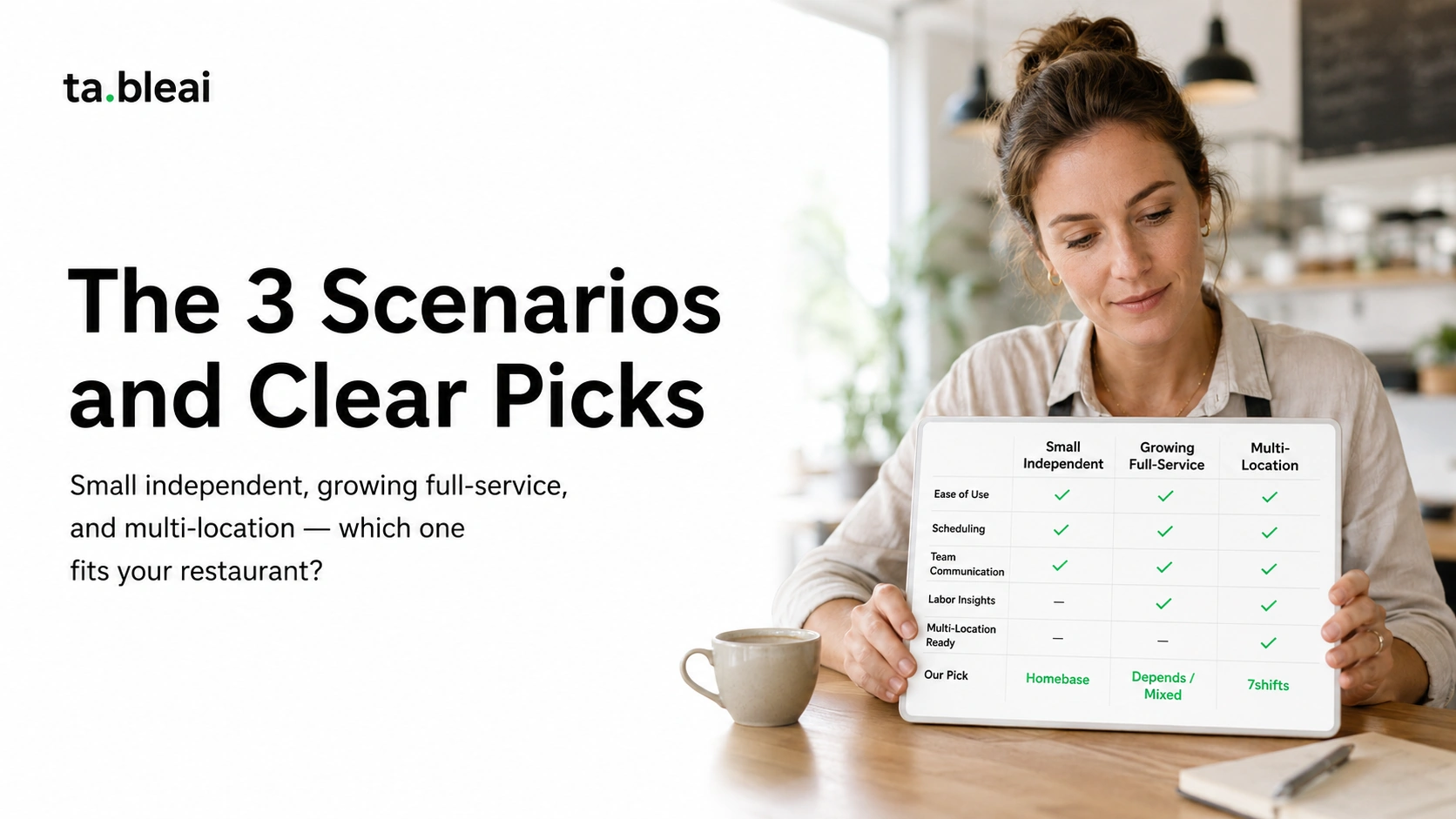
- Basic (Free): Unlimited employees at 1 location. Scheduling, time clock, team messaging, hiring tools, POS integrations. Genuinely free forever, not a trial.
- Essentials: $24.95/month per location. Adds advanced scheduling, availability, time-off management.
- Plus: $59.95/month per location. Adds hiring tools, onboarding, HR compliance features.
- All-in-One: $99.95/month per location. Everything plus payroll.
Payroll: $39/month + $6/employee (bundled in All-in-One plan).
7shifts pricing
- Comp (Free): Up to 30 employees at 1 location. Basic scheduling, time clock, team communication. Missing key features like labor forecasting and integrations.
- Entrée: $39.99/month per location. Adds labor forecasting, POS integration, advanced scheduling.
- The Works: $76.99/month per location. Adds task management, deeper analytics, tip pooling.
- Gourmet: custom pricing. For multi-location operators.
Payroll: Add-on at $39.99/month per location + $6/employee (via Gusto integration).
Real monthly cost for a typical small restaurant
Small independent restaurant, 12 employees, 1 location, needs scheduling + time tracking + basic communication:
Homebase (Free plan): $0/month. Genuinely covers the need.
7shifts (Comp/Free plan): $0/month. Also covers the need, but caps at 30 employees and misses labor forecasting.
Same restaurant if it grows to 25 employees and wants labor forecasting + hiring tools:
Homebase (Essentials): $24.95/month. 7shifts (Entrée): $39.99/month.
Same restaurant with 2 locations and 40 employees each:
Homebase (Essentials): $49.90/month total ($24.95 × 2 locations). 7shifts (Entrée): $79.98/month total.
Homebase runs $15-30/month cheaper at every tier for equivalent capability.
Feature-by-feature comparison
Scheduling
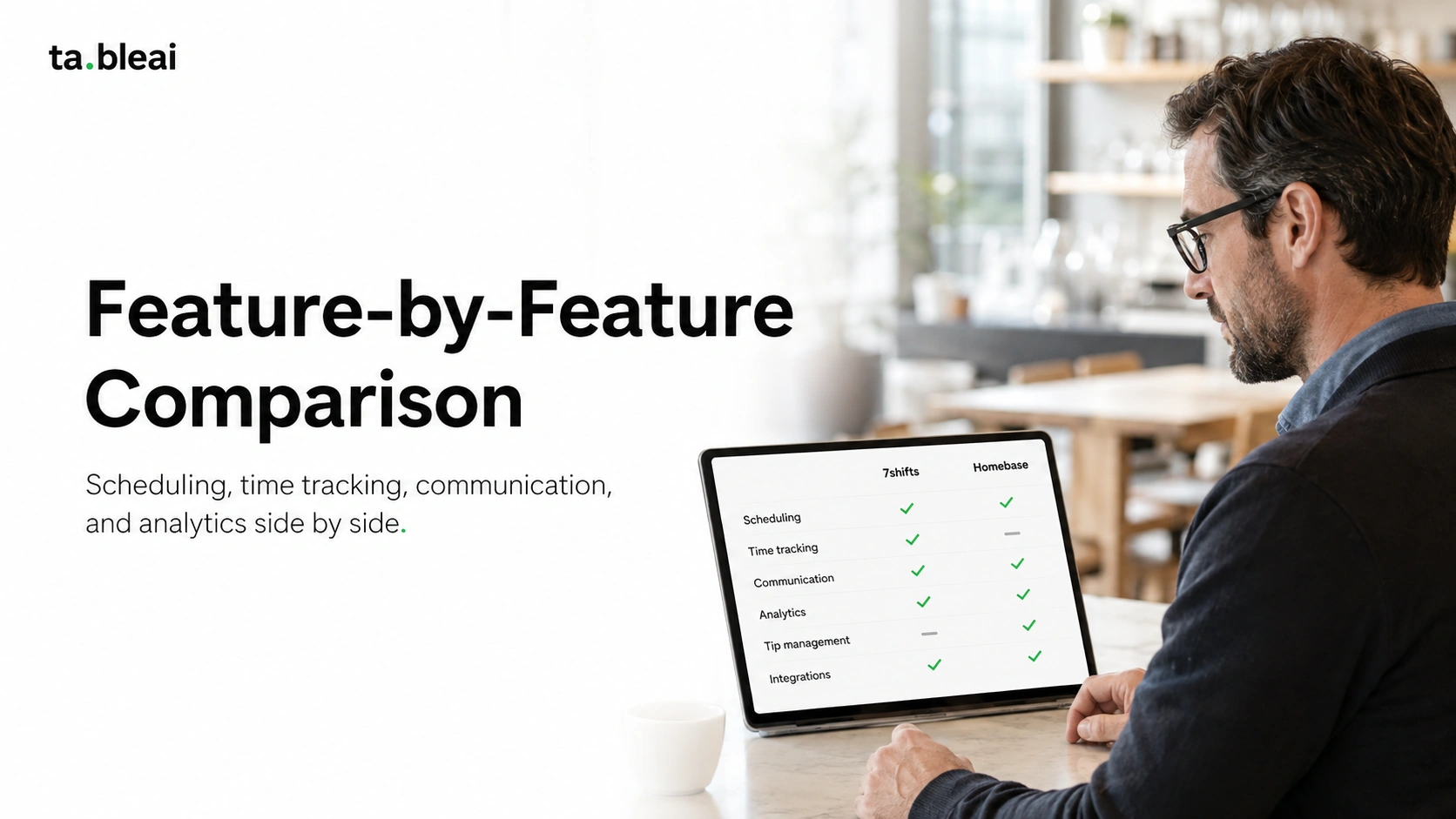
Homebase: Drag-and-drop scheduling, templates, mobile app, availability tracking, shift swap requests. Solid on basics.
7shifts: Same basics plus labor cost forecasting (sales-to-labor ratio targeting), POS-integrated forecasts (schedule based on predicted sales), role/section-based scheduling for FOH/BOH.
Winner: 7shifts for restaurant-specific depth. Homebase is fine if you don't need labor forecasting.
Time tracking / time clocks
Homebase: Employees clock in via phone with GPS verification, or via a shared tablet. Manager approves timesheets. Break tracking.
7shifts: Similar functionality, plus "7punches" app with selfie-based clock-in and geofencing to prevent buddy-punching. Time tracking on 7shifts requires The Works tier ($76.99/month) — this is a real gotcha.
Winner: Homebase for value (time tracking on the free tier). 7shifts if you have theft problems that justify selfie verification.
Team communication
Homebase: Built-in team messaging, shift notifications, announcements.
7shifts: Similar messaging, plus manager logbook for shift notes and pre-shift communication.
Winner: Tie for small operations. 7shifts pulls ahead if you rely heavily on manager-to-manager handoffs.
POS integrations
Homebase: Integrates with Square, Clover, Shopify, Toast. Pulls sales data to inform scheduling.
7shifts: Deeper integrations with restaurant-focused POS systems (Toast, Square for Restaurants, Clover, Lightspeed, TouchBistro). Better data flow for labor forecasting.
Winner: 7shifts if labor-cost precision matters to you.
Tip pooling and management
Homebase: Basic tip tracking, no advanced pooling calculator.
7shifts: Native tip pooling with configurable rules (pool by role, by points, by tip-out percentages). Handles complex tip distributions that full-service restaurants actually use.
Winner: 7shifts, clearly. If you tip out bussers/runners/bartenders in complex ways, 7shifts is worth the price bump.
Hiring and onboarding
Homebase: Post to Indeed, ZipRecruiter, etc. directly from Homebase. Onboarding checklists, W-4/I-9 collection, e-signature.
7shifts: Onboarding available on higher tiers. Less depth on the hiring side than Homebase.
Winner: Homebase. If you hire frequently (turnover is real in restaurants), this feature actually matters.
Compliance and labor laws
Homebase: Basic overtime alerts, break enforcement, break reminders.
7shifts: Deeper compliance features — advance scheduling notifications (for cities that require Fair Workweek), overtime forecasting, meal-break tracking.
Winner: 7shifts if you operate in a city with restrictive scheduling laws (Seattle, San Francisco, NYC, Philadelphia, Chicago). Homebase if you're in a simpler regulatory environment.
Payroll integration
Homebase: Bundled payroll in All-in-One plan ($99.95/month + $6/employee). Runs payroll directly through Homebase, no third party.
7shifts: Payroll via Gusto integration or as add-on service, additional $39.99/month + $6/employee on top of scheduling plan.
Winner: Homebase if you want everything in one bill. 7shifts if you already love Gusto and want to keep them.
Reporting and analytics
Homebase: Basic labor reports, sales-to-labor ratio, hours-by-role. Sufficient for most small operations.
7shifts: Deeper analytics — schedule vs. actual variance, labor cost trends, projected vs. actual labor, tip analytics.
Winner: 7shifts for data-driven managers. Homebase for owners who just want to know "did we spend too much on labor this week."
The 3 scenarios and clear picks
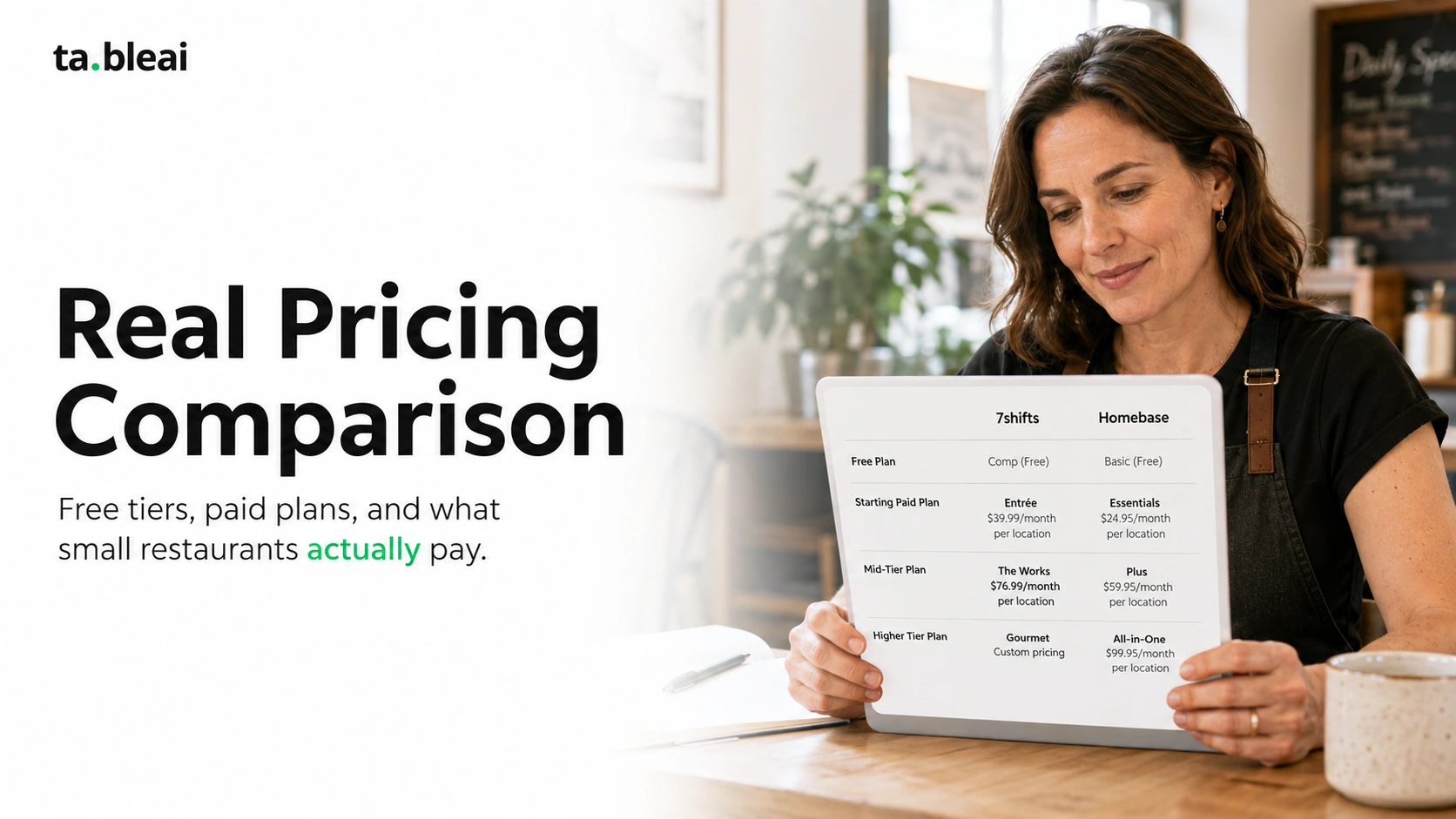
Scenario 1: Small independent (under 20 employees, 1 location)
Coffee shop, small cafe, food truck, quick-service spot.
Pick Homebase. The free plan covers everything you need. Even the paid plans are cheaper than 7shifts equivalents. You don't need labor forecasting when your labor decisions are "who's on Tuesday morning."
Scenario 2: Growing full-service restaurant (20-50 employees, 1-2 locations)
Casual dining, brunch spot, bar-and-grill with FOH and BOH staff.
Depends on tip complexity. If you have complex tip pools (multi-role tip-outs, bartender pools), pick 7shifts — the tip pooling alone justifies the price. If your tips are simple (or you're a counter-service concept without tipping), Homebase Essentials handles it.
Scenario 3: Multi-location group (50+ employees, 2+ locations)
Restaurant group, franchise, multi-concept operator.
Pick 7shifts. At this scale, labor forecasting saves real money. The deeper analytics and multi-location dashboards are worth the premium. Homebase can technically handle this but you'll feel the ceiling.
What both companies don't tell you
1. Free tiers are enough for most small restaurants — for a while.
Both companies offer free tiers because they know most small operators will stay on them for 6-18 months, then upgrade as they grow. Nothing wrong with starting free. The mistake is upgrading before you actually need the features — pay for paid features when a specific problem drives you to it, not because the sales rep suggested it.
2. Homebase now competes directly on restaurant features.
Historically, 7shifts had the restaurant-specific advantage clearly. In 2025-2026, Homebase has aggressively added restaurant features (tip management, deeper POS integrations, restaurant-focused templates). The gap has closed. If you're comparing based on old reviews from 2022-2023, the picture has changed.
3. Neither replaces good communication.
Both tools claim to solve staff communication. In practice, most restaurants still use WhatsApp or texting for real conversations because their staff already have those apps. The tools work best for structured stuff — schedules, shift swaps, time-off requests — not for the "hey, can anyone cover tomorrow morning" panic that actually keeps restaurants staffed.
Common questions
Is 7shifts really worth the extra $15-25/month over Homebase?
For most small restaurants, no. For full-service restaurants with complex tip pools and $50K+/month in sales, yes — the labor forecasting alone can save more than the price difference.
Can I use both?
Technically yes but pointless. Pick one, migrate fully.
Does either integrate with Toast POS?
Yes, both integrate with Toast. 7shifts' integration is more mature (deeper data flow), Homebase's is functional but simpler.
What about payroll — should I use theirs or a dedicated service?
If you have simple needs (hourly staff, standard payroll cycles), the bundled payroll in Homebase All-in-One is fine and cheaper than third-party. If your payroll is complex (multi-state, tipped vs. non-tipped, salaried managers), use a dedicated service like Gusto or ADP.
How hard is it to switch between them?
Fairly easy. You export your employee list from one, import to the other, rebuild schedules and time-off policies. Takes 2-4 hours. Not a barrier.
What if I already have Toast Payroll or Square Team Management?
Those tools cover basic scheduling. But they're less capable than either 7shifts or Homebase as standalone scheduling tools. If scheduling is a pain point, adding Homebase or 7shifts on top is worth it. If scheduling is easy for you, don't add another tool just to have it.
Which has better mobile app for staff?
Both are good. 7shifts arguably has slight edge in restaurant workflows (staff shift-swaps, tip visibility). Homebase has slight edge in general usability.
Bottom line
Homebase for small independent restaurants, quick service, and cost-sensitive operators. Free tier is a genuine free tier, paid tiers are cheaper than 7shifts, and the features cover what small operations actually need.
7shifts for full-service restaurants, multi-location groups, and any restaurant where labor cost as a % of sales is something you actively manage. Restaurant-specific depth is real and worth the price if you'll use it.
If you're not sure which you are, start with Homebase's free tier. If you find yourself needing labor forecasting, complex tip pools, or advanced compliance features within 6 months, migrate to 7shifts. Better to under-buy and upgrade than over-buy and never use half the features.
Both are better than trying to manage scheduling in a group text with your staff — which, honestly, is what most small restaurants still do.
If you're looking to reduce restaurant tool sprawl entirely, TableAI covers the "quick text-based operations" layer (sales tracking, inventory alerts, staff notes) via WhatsApp. It's not a scheduling replacement — you'd still need Homebase or 7shifts for actual shift management — but many small operators find they can drop other tracking tools and just use TableAI + a scheduling app. Free during early access.